Solo
14,90 €/ month · excl. VAT 24%
1 user
Shared directory, personal management of contacts, appointments and routes.
Contact us

Search for businesses in the shared business directory and organize your team’s contacts, notes, calls and follow-ups, along with appointments and personal routes, on desktop and mobile.
Buy online by card via Stripe · automatic renewal, cancel anytime. Subscription terms
SalesRadar Solo · 1 user · no card required. It starts automatically for every new account or team, with no card.
Windows & Android · iPhone coming soon · 1.2.17
Coming soon to iPhone (App Store) and Android (Google Play). Until then, download it for Windows and Android from Downloads.
Manuals and presentations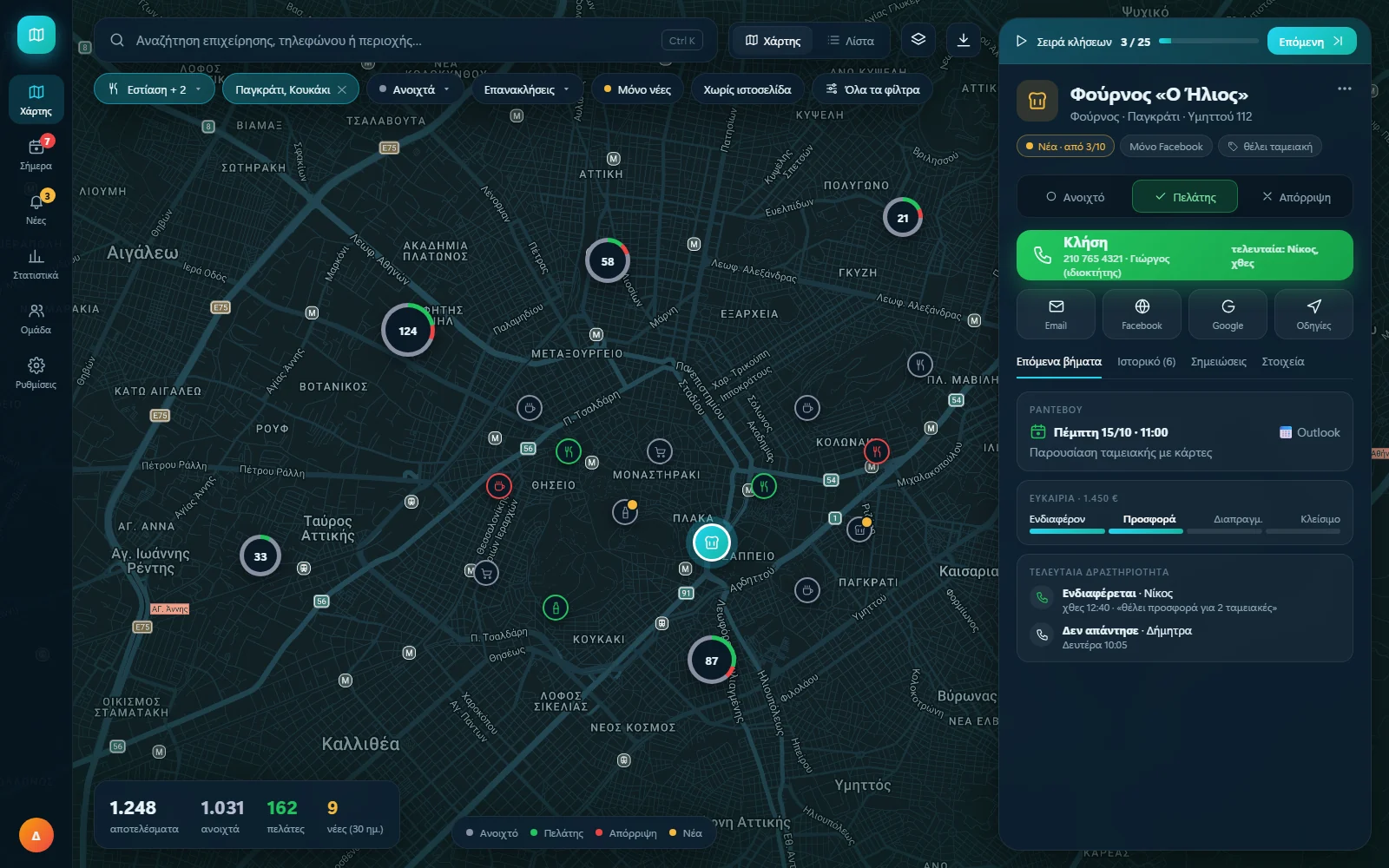
On every business card, public data from the official Greek registers — no personal data of individuals.
Sources: GEMI – KEEE (ODC-BY-1.0), KIMDIS (CC BY 4.0), Diavgeia.
The Google satellite map with pins and zoom has been specifically tested in SalesRadar for Windows and RTFlow Sales Suite for Windows.
A small button opens the map controls in a pop-up panel with pan arrows, zoom controls and a close button.
Verification applies to Windows. The satellite map has not been verified on Android.
Actual Windows Current version and Android Current version apps with official installers. Installation and updates differ by platform· see the instructions in Downloads.
Account and team data on the service's privately managed server. The shared directory is separate from each team's private notes. There is no automatic synchronization with OrderApp.
Sign in to the app with an RTFlow account or use «Sign in with Google». No activation codes: RTFlow assigns the license to your account. Updates are delivered automatically through the app and are digitally signed.
SalesRadar Solo · 1 user. It starts automatically for every new account or team, with no card.
Monthly subscription · excl. VAT 24%
14,90 €/ month · excl. VAT 24%
1 user
Shared directory, personal management of contacts, appointments and routes.
Contact us34,90 €/ month · excl. VAT 24%
Up to 5 users
Sales team management with separate data for each team.
Contact us69,00 €/ month · excl. VAT 24%
Up to 15 users
SalesRadar features for a larger sales team.
Contact usPurchase online by card via Stripe or by contacting us. The subscription renews automatically until cancelled.
Subscription terms and rightsWithout a shared point of reference, the team's contacts live in notebooks, files and individual memories. No one knows who last made contact, what was agreed or when to follow up. SalesRadar keeps this information organized, separately for each sales team.
Search the shared business directory and map using three filters, always in the same order.
Narrow your search to the type of business you are interested in.
Focus on the geographical area you or your team cover.
Choose whether to show or hide chain stores.
SalesRadar organizes work separately for each sales team, so everyone sees what is relevant to them.
Assign tasks and contacts to team members, making it clear who does what.
Notes, contact status and contact details are kept separately for each sales team.
Monitor the statistics available in the app to organize your sales.
Keep your work organized, from the first search to the next contact.
Search the shared directory and map using Category · Area · Chains filters.
Contact status and notes to help you keep track of each business relationship.
Call history and follow-ups for your next conversation.
Schedule your meetings and keep them organized.
Map stops in your chosen order and navigate via Google Maps, without automatic optimization.
Assignments and team organization, with separate notes and contact details for each sales team.
Monitor the statistics available in the app to organize your sales.
Use the available exports for the data you need in your work.
Category · Area · Chains, contact status and next steps: follow-up, appointment and opportunity.
The contact's notes tab with a controlled example and a dictation option. The new APK version is still being tested· its availability in the public Android download has not been confirmed.
The app's actual chart in a presentation setting, with sample daily call values· not the performance of a real business.
Search for businesses on the map and view the selected contact.
SalesRadar is an independent app by RTFlow. It does not sync automatically with OrderApp. New businesses are published in the shared directory only after administrator approval, with checks for potential duplicates.
Use the Category · Area · Chains filters to find the business on the map.
Add notes, a follow-up or an appointment for your team.
Arrange the stops in your preferred order and open navigation in Google Maps.
SalesRadar is a modern CRM for organizing sales and customer contacts. It includes a shared business directory and tools for managing contacts, notes, contact status, call history and follow-ups separately for each sales team, as well as appointments, personal routes, assignments, statistics and exports. It does not include ERP invoicing, marketing automation or bulk email.
The filters appear in the order Category · Area · Chains, for finding businesses in the shared business directory and on the map.
SalesRadar can be customized to your business needs under a separate agreement defining the scope of customization. Customization is not automatically included in the subscription, nor does it imply automatic integration with OrderApp.
The new built-in Greek dictation feature has been implemented, but the new APK version is still being tested. Its availability in the public Android download has not been confirmed.
Voice dictation for notes: writes what you say, listens continuously until you tap the microphone again (up to 5 minutes on computers). Forgot password: set a new password with a code sent by email. Satellite map on iPhone too.
In the official RTFlow downloads. Versions and links are updated by the app distribution service.
The Google satellite map with pins and zoom has been specifically tested in SalesRadar for Windows and RTFlow Sales Suite for Windows. A small button opens the map controls in a pop-up panel, with navigation arrows, zoom and a close button. This verification applies to Windows. The satellite map has not been verified on Android.
A time-limited right of use, without prejudice to your statutory rights. The full conditions are set out in the Terms.
Subscription termsA time-limited right of use, without prejudice to your statutory rights. The full conditions are set out in the Terms.
Subscription termsA time-limited right of use, without prejudice to your statutory rights. The full conditions are set out in the Terms.
Subscription termsA time-limited right of use, without prejudice to your statutory rights. The full conditions are set out in the Terms.
Subscription termsSubscription-based use does not imply unlimited support or an agreed service level (SLA). The scope of support and any specific SLA require a separate, explicit agreement, without restricting mandatory statutory rights.
These terms describe the monthly or annual subscription model and do not retroactively amend rights under special or older (legacy) licenses already issued. Those licenses remain subject to their respective agreed terms and mandatory statutory rights.
Free 14-day SalesRadar trial with no card, strictly for 1 user with Solo features, not Team. The duration is tracked per business/team and does not restart when new members are invited. Invitations do not increase the trial’s 1-user limit. The trial starts automatically for every new team and expires on its own, with no charge.
The same approved SalesRadar plans apply to web, Windows and Android: Solo 15€ / 1 user, Team 35€ / up to 5 users, Business 69€ / up to 15 users. Prices are monthly, excl. VAT 24%, per business. SalesRadar also runs in the browser at app.rtflow.gr, with the same account and the same plans.
The right to use SalesRadar is valid only during the active monthly or annual subscription period or trial. After expiry, renewal is required to continue subscription use. No lifetime software purchase or free indefinite license is offered. The subscription renews automatically at the end of each period (month or year) for an equal period, by charging the registered card, until it is cancelled.
This presentation describes the approved terms, not verified expiry-check functionality. The service's actual expiry and renewal checks require separate verification before commercial release. Local simulations do not activate or renew a license.
Online by card via Stripe from the “My account” page, with automatic renewal and cancellation at any time. Alternatively by bank deposit after contacting us.
Sign in to the app with an RTFlow account or use «Sign in with Google». No activation codes: RTFlow assigns the license to your account.
Updates are delivered automatically through the app and are digitally signed.
Suggested businesses are published in the shared directory only after administrator approval. Potential duplicates are reviewed, and the administrator makes the decision, with no automatic merging of records where there is uncertainty.
No. Each user sets the order of stops on their own route. Navigation uses Google Maps· automatic route optimization and printing are not provided.
Coming soon to iPhone (App Store) and Android (Google Play). Until then, download it for Windows and Android from Downloads.
The directory does not guarantee that information on whether each business is operating or has closed is always up to date. Confirm the details before visiting.
Talk to us about an app or a project for your business.
