Mobile
9,00 €/ month · excl. VAT 24%
0 PCs · 1 mobile
Manual order entry, export and local history.
Contact us

Turn orders from email, text, PDF and Excel into validated product lines with ERP codes.
Buy online by card via Stripe · automatic renewal, cancel anytime. Subscription terms
OrderApp Pro · no card required. It starts automatically for every new account or team, with no card.
Windows & Android · iPhone coming soon · 1.4.11
Coming soon to iPhone (App Store) and Android (Google Play). Until then, download it for Windows and Android from Downloads.
Manuals and presentations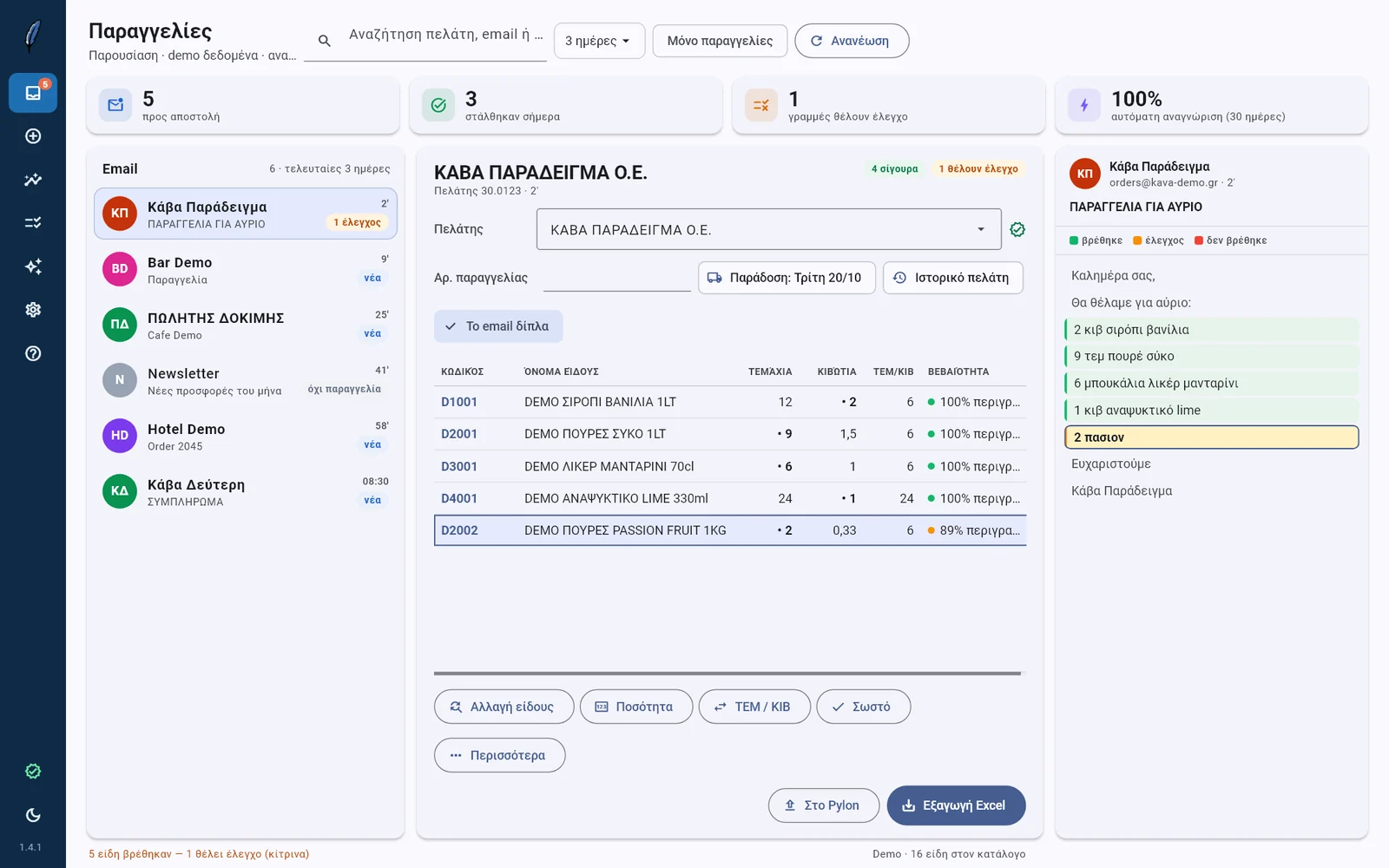
From cleaning supplies to personal care and tools, everyday ordering needs clear product line items.

Cleaning products, sponges and everyday essentials: organize your manually entered order and check codes, units and cartons before exporting.
Local Windows/Android app, version Current version, with a time-limited right of use, available through the official downloads. Available PC and mobile slots are determined by the planned subscription tier. Mobile does not include a PC slot.
Sign in to the app with an RTFlow account or use «Sign in with Google». No activation codes: RTFlow assigns the license to your account. Updates are delivered automatically through the app and are digitally signed.
Orders and customer history on the individual device. Additional slots do not provide automatic synchronization, shared history or integration with SalesRadar.
Imports and automated sending are included in Pro/Business· picking in Business. ERP integration and custom setup are separate. Optional AI with control over what is sent· local AI is an option on Windows only.
Monthly subscription · excl. VAT 24%
9,00 €/ month · excl. VAT 24%
0 PCs · 1 mobile
Manual order entry, export and local history.
Contact us19,00 €/ month · excl. VAT 24%
1 PC · 1 mobile
Manual order entry, export and local history.
Contact us39,00 €/ month · excl. VAT 24%
3 PCs · 3 mobiles
Everything in Start, email/PDF/Excel imports and automated sending after setup.
Contact us79,00 €/ month · excl. VAT 24%
5 PCs · 10 mobiles
Everything in Pro plus a picking list.
Contact usPurchase online by card via Stripe or by contacting us. The subscription renews automatically until cancelled.
Subscription terms and rightsOrderApp is a standalone RTFlow app. It does not automatically sync with SalesRadar.
Check products, ERP codes, units and boxes. Make any necessary corrections before proceeding.
Excel export and file sharing. The planned Pro/Business offering adds email/PDF/Excel imports and automatic sending after setup, with two email accounts.
View the customer's history on that specific device, see their usual products and repeat an order.
An optional, configurable AI assistant with visibility and control over what is sent to AI, plus a local AI option on Windows. Optional Pylon integration with separate setup, picking in the planned Business plan, and password-protected backups.
Start by entering an order manually. The planned Pro/Business plans will add email, PDF and Excel imports.
Review the product lines, ERP codes, units and boxes.
Export to Excel, share the file or use the Pylon integration if it has been configured.
Sign in to the app with an RTFlow account or use «Sign in with Google». No activation codes: RTFlow assigns the license to your account.
Updates are delivered automatically through the app and are digitally signed.
Sign in with Microsoft (Outlook, Hotmail, Microsoft 365) with no setup. Forgot password on RTFlow account sign-in.
14 days, no card. It starts automatically for every new account or team, with no card.
A time-limited right of use, without prejudice to your statutory rights. The full conditions are set out in the Terms.
Subscription termsA time-limited right of use, without prejudice to your statutory rights. The full conditions are set out in the Terms.
Subscription termsA time-limited right of use, without prejudice to your statutory rights. The full conditions are set out in the Terms.
Subscription termsA time-limited right of use, without prejudice to your statutory rights. The full conditions are set out in the Terms.
Subscription termsSubscription-based use does not imply unlimited support or an agreed service level (SLA). The scope of support and any specific SLA require a separate, explicit agreement, without restricting mandatory statutory rights.
These terms describe the monthly or annual subscription model and do not retroactively amend rights under special or older (legacy) licenses already issued. Those licenses remain subject to their respective agreed terms and mandatory statutory rights.
OrderApp is a locally installed Windows/Android app with a time-limited right of use under the planned subscription model, not a service where all functions and data are hosted in the cloud. History remains device-specific· email, ERP and optional AI operate according to their settings, with no automatic order synchronization or shared history between devices or with SalesRadar.
Online by card via Stripe from the “My account” page, with automatic renewal and cancellation at any time. Alternatively by bank deposit after contacting us.
Customer history is specific to each device: it includes the customer's usual products and the option to repeat an order. It is not a single, centralized customer database.
The AI assistant is optional and requires setup. You can see and control the data sent to AI. A local AI option is also available on Windows.
An optional Pylon integration is available and requires setup. Alternatively, you can use the Excel export and file-sharing options.
No. OrderApp and SalesRadar are two independent RTFlow apps. Automatic syncing and a shared central customer database are not provided.
Coming soon to iPhone (App Store) and Android (Google Play). Until then, download it for Windows and Android from Downloads.
OrderApp supports password-protected backups.
Talk to us about an app or a project for your business.
